Vibe Coding For Realsies: Spec Driven Development

Note: for the actual implementation details on my experiments around SDD, check my demo walkthrough doc.

If you’ve spent any time with AI coding agents, you know the thrill. You ask for an expense tracker, it generates one. You ask for a menu feature, it adds it. You point out a bug, it proposes a fix. It feels like magic—until it doesn’t.

Inevitably, the model starts hallucinating features, forgetting earlier decisions, or creating code paths you never asked for. You try to rein it in with a custom instructions file , but those quickly fall out of date. Before long, you’re wrestling with the very agent that was supposed to save you time.

Spec-Driven Development (SDD) is the antidote to this chaos.

Rather than letting code (and an over-eager LLM) dictate direction, SDD gives us structure, guardrails, and a development rhythm that creates clarity instead of drift.

What Is Spec-Driven Development? (SDD)

Specifications can make or break any project. For example, a few years ago I was in charge of a development team tasked with producing a product catalog Web API. Right on schedule, two weeks before we were due to roll out the resident silverback software architect dropped a bomb on us – a late breaking requirement that would instantly have spiraled the project’s complexity by a factor of ten, and made us months late in delivery. Having a strict written functional requirement I could point to (in this case a response time under 0.2 seconds), and a delivery date in the near term, acted as a magic shield to keep us on track.

Specs can be both a shield and a trap. As I wrote in my book, it’s the nonfunctional requirements- which often aren’t understood well by the project team or are implicit – that can delay or sink a software project. Database standards, authorization requirements and security standards, lengthy and late-breaking deployment policies – the fog of the unknown has us in its grip.

Spec-Driven Development (SDD) is meant to address this gap. Instead of code leading the way and the understood project goals and context falling hopelessly behind – the spec drives everything. Implementation, checklists, and task breakdowns are no longer vague.

The promise is that this uses AI capabilities and agentic development the right way. It amplifies a developers’ effectiveness by automating or handing off repetitive work that an agent can often do much more quickly and effectively – leaving us to do the actual creative work humans do best; refactoring, directing and steering code development, critical thinking around feature best paths.

I like the writeup from the GH blog by one of the speckit coauthors, Den:
Instead of coding first and writing docs later, in spec-driven development, you start with a (you guessed it) spec. This is a contract for how your code should behave and becomes the source of truth your tools and AI agents use to generate, test, and validate code. The result is less guesswork, fewer surprises, and higher-quality code.

Unlike the vibe coding videos I’ve seen, which are mostly greenfield and very POC / MVP level in complexity – I think SDD has the potential to be ubiquitous. It could fit almost anywhere, even with very complex and monolithic app structures. It could help with large existing legacy applications. And it enforces development standards that can prevent a lot of wasted time and effort.

Let’s start with a quick overview of the process.  

Specify, Plan, Tasks, Implement: A Four Step Dance

Software development with SDD follows this lifecycle:

Instead of jumping into coding (or vibe-coding your way into a corner), you follow a four-step loop:

  • 1. /specify — Describe what you want: High-level aims, user value, definitions of success. No tech stack. No architecture.
  • 2. /plan — Decide how to build it. Architecture, constraints, dependencies, standards, security rules, and any nonfunctional requirements.
  • 3. /tasks — Break it down. Small, testable, atomic units of work that the agent can execute safely.
  • 4. /implement — Generate and validate the code. Here TDD is mandated. Tests first, then implementation, then refinement.

Starting with a constitution is a game changer because – as the orig specs state – they’re immutable. Our implementation path might change, and we can even change the LLM of choice  – but these core principles remain constant.. Adding new features shouldn’t render our older system design work invalid.

Step 1: / specify

You start with a constitution: the unchanging principles and standards for your project. It’s the backbone of everything that comes after.

GitHub’s Spec Kit can generate a detailed spec file from even a one-line input like “I need a photo album site that allows me to drop and share photos with friends.” It even marks uncertainties with [NEEDS CLARIFICATION], essentially flagging the traps LLMs usually fall into. And though this is optional – I would highly recommend running /clarify to address each ambiguity, refining your spec until it reflects exactly what you want the system to do.

By the end, you’ve got:

  • A shared understanding of what success looks like
  • A great first draft of what user stories, acceptance criteria, and feature requirements you have for the project.
  • Clear user stories
  • Acceptance criteria
  • Detailed requirements
  • Edge cases you probably wouldn’t have thought of

Step 2: /plan

We just finished our first stab at “why” – this is where the “how” comes in. /plan is where we feed the LLM our tech choices, constraints, standards, and organizational rules.

Backend in Node? React front end? Performance budgets? Security controls? Deployment quirks? Legacy interactions? All of it goes here. As Den notes in the GitHub blog:

Specs and plans become the home for security requirements, design system rules, compliance constraints, and integration details that are usually scattered across wikis, Slack threads, or someone’s brain.

Spec Kit turns all of this into:

  • Architecture breakdowns
  • Data models
  • Test scenarios
  • Quickstart documentation
  • A clean folder structure
  • Research notes
  • Multiple plan options if you request them
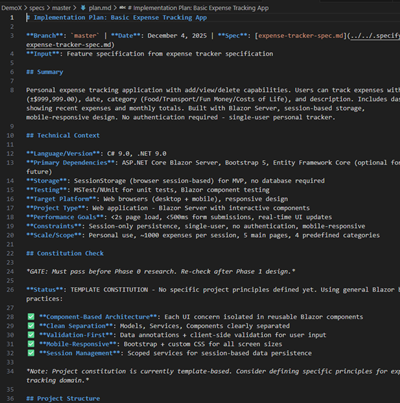
Look at that beautiful list of functionality… Including a very nifty app structure tree. OMG!

Step 3: /tasks

The third phase is where you ask the LLM to slice the plan we just created into bite-sized tasks—small enough to be safe, testable, and implementable without hallucination. It also flags “priority” tasks and provides a checklist view for the entire project.

This creates something rare: truly atomic, reviewable, deterministic units of work.

The /analyze command is especially powerful—it has the agent audit its own plan to surface hidden risks or missing pieces.

At first glance – this is a nearly overwhelming amount of work:
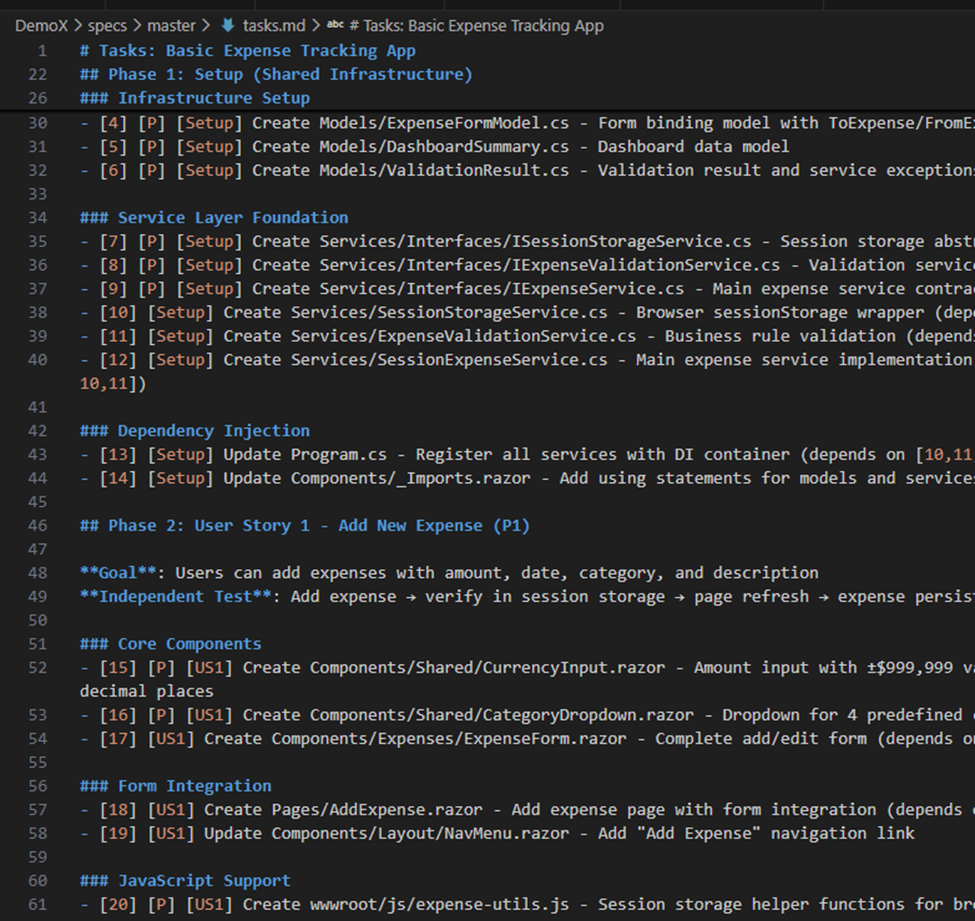
This is a lot to go through!! Where to start? Thankfully it tells me which ones are important:

Step 4: /implement

Now the LLM finally writes code. But instead of working from guesswork and half-remembered context, the agent is now writing code from:

  • A clarified spec
  • A vetted plan
  • A task list
  • Test requirements
  • An architectural contract
  • Immutable principles

You can implement by phase or by task range. Smaller ranges work better for large projects (context windows get spicy otherwise).

The best part? Updating a feature is now simple: change the spec, regenerate the plan, regenerate tasks, re-implement. All of the heavy lifting that used to discourage change is gone.

Summing Things Up

The real magic of SDD isn’t the commands—it’s the mindset:

  • Specs are living, executable artifacts
  • Requirements and architecture stay fresh
  • Tests are generated before code
  • LLMs stop improvising
  • Creativity shifts from plumbing to design
  • Consistency is enforced, not hoped for
  • Documentation emerges automatically
  • Adding features becomes a natural loop
  • Legacy modernization becomes sane again

As AWS and GitHub both point out, vibe coding is intoxicating but fragile. It struggles with large codebases, complex tasks, missing context, and unspoken decisions. SDD fixes the brittleness without killing the creativity.

It keeps the fun of vibe coding, but adds discipline, traceability, and clarity—like pairing with a brilliant junior dev who follows instructions with perfect literalness.

I do think Spec Driven Development will be changing very rapidly over the next few years. But it definitely is here to stay! Its in line with how AI coding agents are meant to work, and it allows us to focus on the creative / business implications of what we’re writing – a force multiplier for the innovative developer.

For Future Research

I already mentioned more work to come on having the coding agent generate different approaches for comparison; also what the implementation might look like with different models besides Claude Sonnet.

Some interesting statements by Den in that GH blog article: “Feature work on existing systems, where he calls out that advanced context engineering practices might be needed.” What are these exactly?

A second point follows right after:

“Legacy modernization: When you need to rebuild a legacy system, the original intent is often lost to time. With the spec-driven development process offered in Spec Kit, you can capture the essential business logic in a modern spec, design a fresh architecture in the plan, and then let the AI rebuild the system from the ground up, without carrying forward inherited technical debt.”

I’d like to see this! We need more videos demonstrating splicing on new features to a large existing codebase.

References

  • The source repo and where you should start – SDD with Spec Kit (https://github.com/github/spec-kit)
  • Video Goodness:  the 40 min overview video from Den Delimarsky – The ONLY guide you’ll need for GitHub Spec Kit
  • See the detailed process walkthrough here.
  • Background founding principles, a must read… even if lengthy. It all comes from this. For example, the Development Philosophy section at the end clarifies why testing and SDD are PB&J, and how these guiding principles help move us away from monolithic big balls of mud.
  • I liked this video very much… because it walked through the lifecycle below very clearly. Good sample prompts as well.
  • The Uncommon Engineer spends a half day experimenting with SDD. He found it a frustrating experiment. Some of his conclusions: specifications can actually lead to procrastination (user feedback is the only thing that matters), and start embarrassingly simple with your specs. Testing specification compliance is NOT the same thing as testing user value…
  • Den Delimarsky talks vibe coding and SDD on the GitHub blog. “We treat coding agents like search engines when we should be treating them more like literal-minded pair programmers. They excel at pattern recognition but still need unambiguous instructions.”
  • Dr Werner Vogels, AWS re:Invent 2025 keynote. About 40 minutes in we’re talking about SDD – at 46 minutes in – Kiro and function driven development: “The best way to learn is to fail and be gently corrected. You can study grammar all you like  – but really learning is stumbling into a conversation and somebody helps you to get it right. Software works the same way. You can read documentation endlessly – but it is the failed builds and the broken assumptions that really teaches you how a system behaves.”
  • Tomas Vesely from GH explores writing a Go app using SDD. Interestingly, his compilation was slowing over time.

GitHub Copilot and App Modernization

Any developer knows the heartbreak of going through keeping an old app framework up to date – or “lifting and shifting” onto the cloud. I have some not-so-fond memories of spending weeks at times tracking down build errors and mysterious compatibility problems as libraries shift with important apps (built naturally with minimal to no test harness, cause who has time for that!)

Good news! There’s this cool new agent-driven feature in Copilot that promises to allow developers to automate (or at least smooth the process) modernizing apps. GitHub for example is making this claim around dev productivity, with these use cases.

And their vision of how organizations can use AI agents and Copilot in particular is really far reaching. The SRE agent in particular I’m very, VERY interested in!

So as a developer – Copilot can help me migrate to Azure, or upgrade runtime and frameworks, for a set of application types (Azure App Service, Container Apps, AKS) and even allow security hardening:

Let’s find out how easy this is though! I’m thinking this might make a compelling demo for our customers that are trying to maintain / upgrade their legacy apps using Copilot and agent-driven workflows. So let’s kick the tires a bit:

Visual Studio and .NET Walkthrough

So using this AdventureWorks web app target repo – let’s see what the Modernize experience is like. Currently for .NET upgrades (October 2025) this feature is still in Preview – I will say the Java one seems a little more fully featured.

So far so good though. A simple right click (assuming you’ve installed that Modernization add on) – you see a Modernize option (here I’m using Claude Sonnet) right clicking on the solution / project in Solution Explorer:

I could also have just entered “explore more modernization options” in Chat. Here’s what I’m seeing for options:

So I select the Upgrade one. I’m thinking the target long term support .NET framework of 8.0 is good. It generates a slick looking upgrade plan in Markdown:

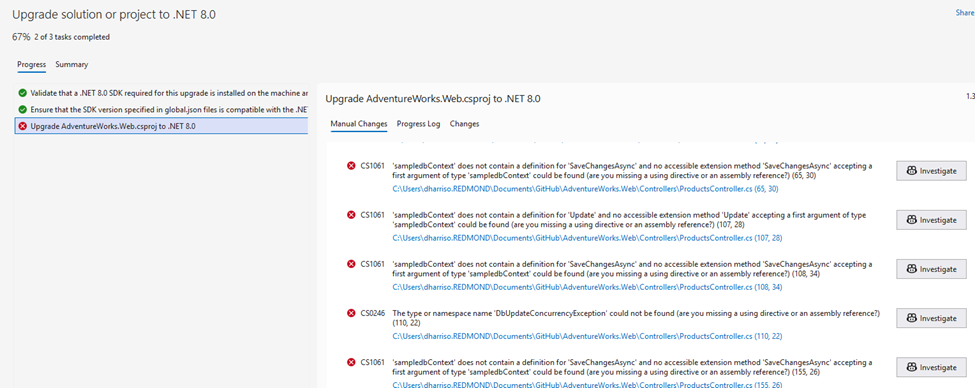
I continue with the upgrade – and whoop, we got our real-world upgrade issues right off the bat. That first one is because Entity Framework references were removed during the upgrade. I’ll have GHCP fix those by clicking those Investigate buttons – and let’s try to build again.

And I hit another error (this time on “Endpoint Routing does not support …UseMVC”) – and I ask Copilot to investigate that as well. Copilot presents me with a few options:

Call me silly, but let’s go with option 1 – the least intrusive / impactful one. I ask Copilot to remove startup.cs and replace Program.cs with their recommended code, and commit pending changes. The next build should work right?

Still getting errors then, now “InvalidOperationException” on the connectionString property not being initialized properly. Copilot actually did a good job of catching these – there’s LOTS of “confirm” prompts, you’ll have to click OK dozens of times. But in the end I did end up with a successful app conversion.

Java walkthrough using Visual Studio Code

I did a walkthrough using this article (based on this Spring repo). I’m not a Java developer and didn’t have Java runtime set up on my desktop, which led to its own headaches! But overall this was the smoothest upgrade and I’d give it high grades. It did a fairly smooth upgrade to Java 21, kicking off with a safe, testable migration plan:

Here’s the steps Copilot is recommending:

  1. Install Java 21 on your development environment
  2. Run ./gradlew clean build to verify the build works
  3. Execute the testing phases outlined in the migration plan
  4. Deploy to staging environment for validation

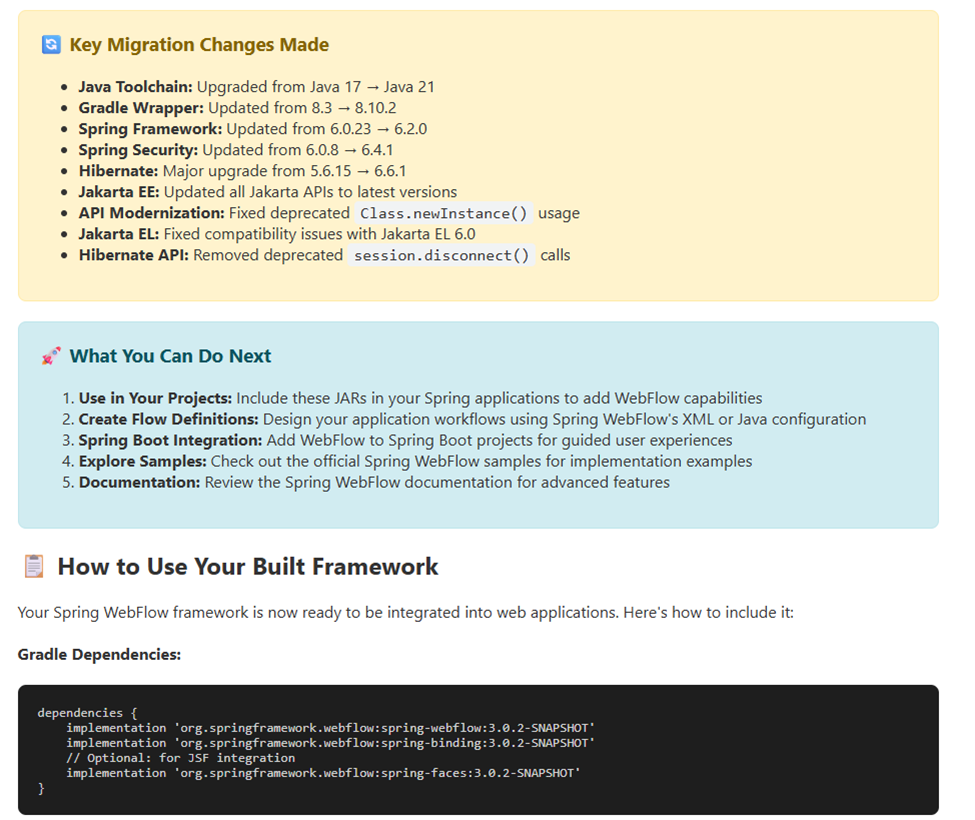
So I asked Copilot to help me install Java 21. A few winget commands later – it even ran that step 2 autonomously to confirm everything was working. I had about 20 minutes of background tasks in setting up Java, working thru compilation issues with the newer Jakarta EL API changes (?). But, long story short – it does work:

I’ll be honest here and say I don’t know enough about Spring, or Java period, to fully test that applet. So I’m trusting the upgrade report a bit! But it does build and run successfully. Nothing else to see here folks!

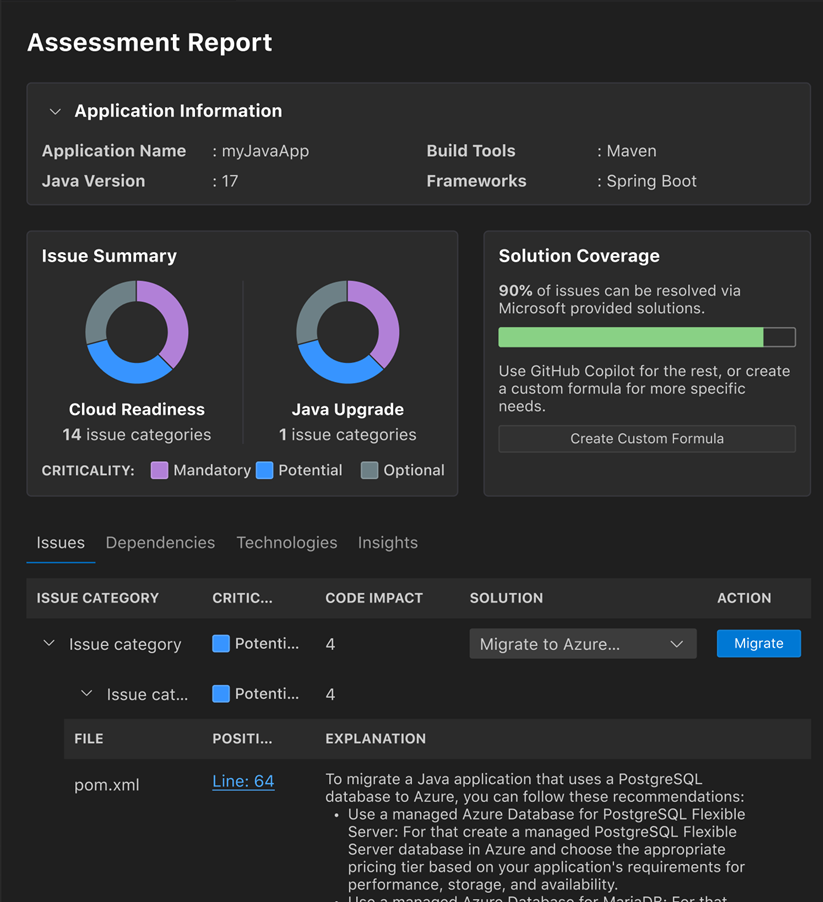
BTW the Java assessment report is quite slick looking:

Some caveats:

  • You do need to have the new GitHub Copilot Pro / Pro+ / Business / Enterprise plan license.
  • If you try to use the current MSLearn walkthrough using .NET on a MSMQ sample project (ContosoUniversity), be prepared for lots and LOTS of upgrade issues. I had to install message queuing / MSMQ (cause that’s super old) and it took a fair amount just to get it to build I think there’s a reason why the documentation kind of peters out. I tried to make the leap to a more modern .NET version and hit nothing but trouble around type/namespace names issues – this is the kind of nightmare the whole Modernization process was supposed to prevent. I think in real life I’d be building out a test harness first – using GHCP naturally – and THEN changing parts of it at a time. Maybe moving the MSMQ portion to Service Bus (without touching the core .NET version) would be a smoother path. Anyway – my thinking is, it’s too big a lift at present, start with a cleaner / more modern sample repo like AdventureWorks. Another option would be just doing the Migrate to Entra ID or Migrate to Azure Service Bus as predefined tasks.
  • Why the focus on a modernization report etc? GitHub explains it best with their upgrade path:

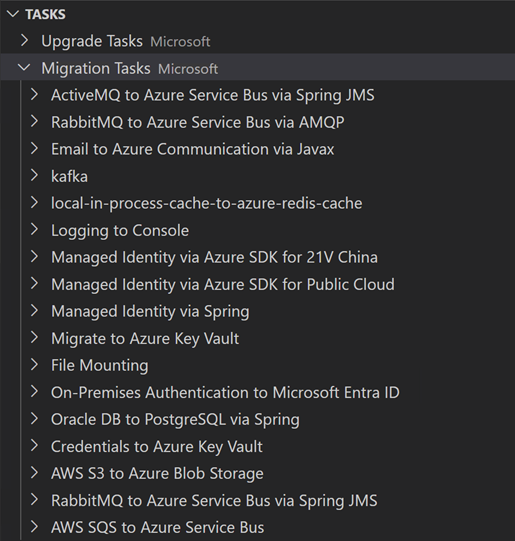
What I would like to do more of down the road is to play more with these predefined tasks to perform code remediation around common migration scenarios – or even roll your own:

Other links and resources

Powershell, Azure Automation and DevOps – Just The Links

Doing some work with a customer around Azure Automation. Here’s some links and resources that I’ve found very helpful as I’m levelling up. Powershell is tried and true and for customers that use scripting / runbooks for building out infrastructure, you don’t have to leave CI/CD at the door. I love the DevOps stack here around YAML pipelines in ADO, Pester, package management, full auditing and rollbacks. I’ll be adding to this over the next few weeks but I’d love your thoughts and additions.

  • There’s a series that Andrew wrote on this that I quite like. Here’s one on accessing a private Powershell repo from Azure Pipelines for example. Another, more complete example, this repo (link here)uses the Pester test framework – written in Powershell! It also uses PSScriptAnalyzer to check for coding standards (in this case just static code analysis). The project is built using InvokeBuild. All build dependencies handled by PSDepend, and Azure Pipelines perform all the tasks around test / build / publishing (see azure-pipelines.yml). With ADO you can use Azure Artifacts to host a private or public PS repository for your modules (samplemodule.nuspec). This is how you get rollbacks etc.
  • Andrew did the best writeup I’ve seen yet on DevOps in Powershell. (this is Mar 2020 but all still valid). This includes
    • Version control with GitHub or Azure Repos.
    • Test automation – we at MSFT favor Pester. Including code coverage analysis (which can be published with each build as a Publish Test Results Task in Nunit format)
    • PSScriptAnalyzer for static code analysis and even custom rules
    • InvokeBuild (or psake) for build.
    • Package Management – use PSDepend to track project dependencies in a simple PS data file.
    • Documentation using PlatyPS – and I think GH Copilot can greatly help us here as well.
    • CI/CD using Azure Pipelines to fire off a Powershell task (or Azure Powershell task for Azure environment runs). (This used in conjunction with INvokeBuild)
    • Artifact Management for reusability. (NOTE I think this is 300 level stuff. We have to walk before we can run!)

GitHub Copilot Fundamentals – Just The Links

Here’s some links that might help you as you start working more with GitHub Copilot. This pairs with the GitHub Fundamentals course I’m teaching this year. The three main refs I like to point to during the class are Refactoring code (GitHub Docs), Modernizing legacy code with GitHub Copilot (GHD), and this interesting rewrite of a Perl script to Typescript.

And on the advanced topics – see the links below around GitHub MCP Server, Prototyping, and Custom Instruction Files. OMG, such good stuff…

Refactoring Code

  • Github has an excellent cookbook that has outstanding prompt suggestions. Things like improving code readability, performance, refactoring data access layers – the works.
  • Probably the best aspect is the ability to refactor, as you go, without interrupting your flow. Another good reference by Github here walks us through it.
  • For performance optimization, I love this article in the perf optimization section of the cookbook.
  • Now for some Microsoft links – the Azure Developer blog discusses how to analyze and suggest improvements around a selected block of code.

Testing

  • GitHub’s docs around testing are excellent. Testing is like eating your vegetables – we all could do more of it, yet we don’t! That kind of tedious, repetitive work is exactly what Copilot excels at.
  • MSLearn has a nice series around building a better test suite, end to end. I especially loved this blog article around testing. It’s comprehensive and covers best practices so well.
  • How can Copilot help with debugging, exception handling and testing? A very nice video, about 11 minutes long, from Harshada Hole from the Visual Studio team.

Documentation

Deployment and Operations

Instruction Files and Custom Responses

MCP Server

  • A full list (curated by GitHub) of MCP Servers. Very similar (if not parallel?) to Microsoft’s. Starting here to show what’s possible wouldn’t be a bad idea for a demo.
  • GitHub’s MCP Server. Repository Management, PR automation, CI/CD workflow intelligence to analyze build failure. A simple extension in VS Code -if allowed by policy. (walk thru text here). There’s a list of installs for other MCP hosts (Windsurf, Cursos, Jetbrains, VS, Eclipse, Claude). For more documentation if you’re getting stuck on authentication with remote servers, see this link.
  • Starting out, follow this example from GH. A very detailed walkthru that should get you to where you can use GitHub’s remote MCP server for Copilot – things like creating a new issue, listing pull requests, etc. Walks you through Oauth / PAT authentication as well.
  • If you are a video learner, I like this 10 minute overview from Andrea Griffiths / Toby Padilla.

Translation

Prompt Engineering

Prototyping and Proofs of Concept

Other Stuff

Thriving in a time of change

I’ve been thinking a lot about fear lately.

I have a very good entrepreneur friend who tells me he’s laying off many of his developers. There’s just no need for them anymore – AI is simply put doing a better job of it. In fact, you can try it yourself – go to Lovable.dev, and ask it to “create a landing page for my website on all things golden retrievers”. About 90 seconds later, there’s your website – mostly functional, just a few tweaks left. AI is a very powerful tool, one that I now find I can’t live without in my daily life. It’s chilling to think that these LLM’s are progressing to the point where they can produce code, document, find defects, and design systems architecture almost instantly – and as good (sometimes better) than I can. And it’s getting better every day.

Is it ok for me to say that this fills me with fear? What will happen to my family and I if I have to change careers? I’ve been in software development all my life. What if that, very suddenly, just goes away?

Unfortunately I have no crystal ball and I don’t know where my industry will be in five years. I do think about my girls, both 17 years old and starting to make their own way in the world. I have no idea on how to best direct them in terms of their career. It seems very likely that they will spend their twenties and thirties as I did, trying new things and failing, getting up and starting over.

So my wife and I are trying to teach them qualities that will help them succeed. Maybe we don’t know what kind of work they’ll be doing. But I can teach them how to work – that never changes. Things like how to take direction. How to actively listen. How to not make your boss’ life difficult. Being humble. Working hard, with purpose.

Listening to some of my colleagues talk about their fears this week had me thinking about what qualities I will need in the years ahead to adapt and be resilient. Here’s my thoughts:

Every lie we tell ourselves comes with a short term benefit and a long term cost. In this case, the belief that we are past the age where we can change – I am what I am – is the greatest limiter at all. It’s comforting though, and that’s the short term payoff. This is who I am. I’m a victim of events beyond my control. I’ve never been able to do that successfully. That’s just not my forte.

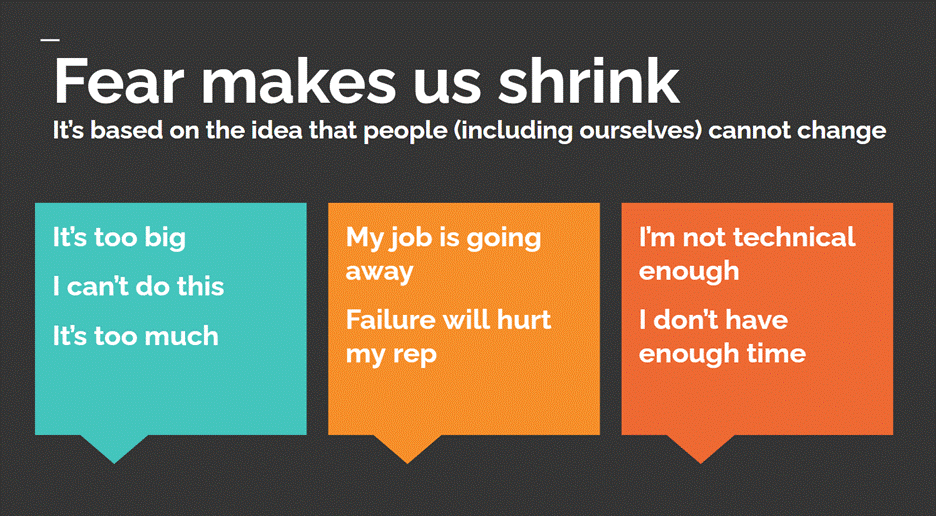
Thoughts like this are comforting, in a weird way, because it promises familiarity, stability. I don’t have to change. The long term cost is – we have stopped learning, adapting. The world is changing – we are trying to stay the same. So we say things like “it’s too big” / “it’s too much”, “I don’t have the time”, “I’m just not a technical person”, etc.

Here I’m indebted to the book “Tiny Habits“, by BJ Fogg. Famously, he would do a few pushups after every time he went to the bathroom. Over time, and we’re talking months / years, he would ramp up the number of pushups. Guess what happened over time with his personal fitness level, from that really small incremental effort?

This really helped me when I found out I had diabetes. After spending some months being totally overwhelmed with the huge changes I had to make, I read this book. I remember closing it and saying to myself, I am the type of person that goes to the gym every day. So I changed that one thing, as a daily habit. Sometimes I would go to the gym and barely show up – like I’d put on my gym shoes and maybe walk for a few minutes. But I would show up. It made a world of difference in my health.

The point of this book, to me, is that big all-out efforts, like that New Year’s Resolution to drop 20 lbs in three months, almost always fail. It’s just too much change, too fast. But incremental, small changes in my habits – like reducing and then cutting out alcohol, or going to the gym – always win, if you stick with it.

The same thing was true when I wrote my book. I called my shot – started telling people, I’m an author. I’m in the middle of writing a book, it will be out in June. I can guarantee you, if I had not have put myself out there like that, the book would never have been written.

So what does this have to do with our mindset during times of epochal change like this one?

Bear with me a bit here. The five qualities above are each worth a blog article of their own. But short and sweet – if we accept that life is impermanent and constantly in flux, and we ourselves are constantly changing with it – then we are capable of adapting to anything, can learn and master ANYTHING we put our minds to. That’s an incredibly empowering thought. In fact, if we have a specific goal we want to accomplish – say, writing a book, or learning the piano, or getting more healthy physically – we can build a little habit and grow it steadily over time to reach that goal. And because we’re trying to learn like children do – without ego, without fear of failure, playing with new things and having fun – growth comes naturally. We’re learning from failure, and we’re persistent, because we have a clear goal and a solid plan. There’ll be days where we can do little or nothing, but we’re not going to burn out – because we forgive ourselves and realize plateaus are a part of life.

The fact is that AI is here to stay and it’s a disruptive change. It’s a threat, no question – but it’s also an opportunity. This is a great time to move away from the employee mindset, and think about creativity – making something new, something distinctively YOURS. AI and large language models are amazing tools, and they’re going to empower us to be creative and do meaningful, high impact work in ways we can’t even imagine. And the best part is, this field is brand new. The barriers will never be lower than this, the frameworks are still taking shape and will never be easier to adopt. So this is the perfect time to try something new in an exciting field where there’s nothing but upside. I can create and make art in my own way in this space, this month.

What new things will you try or learn about this month? I’m excited to find out!